
Gym League Controls
Left HUD, top bar, machines, spacebar posing, Codes, and Feedback — same menus on PC and mobile.
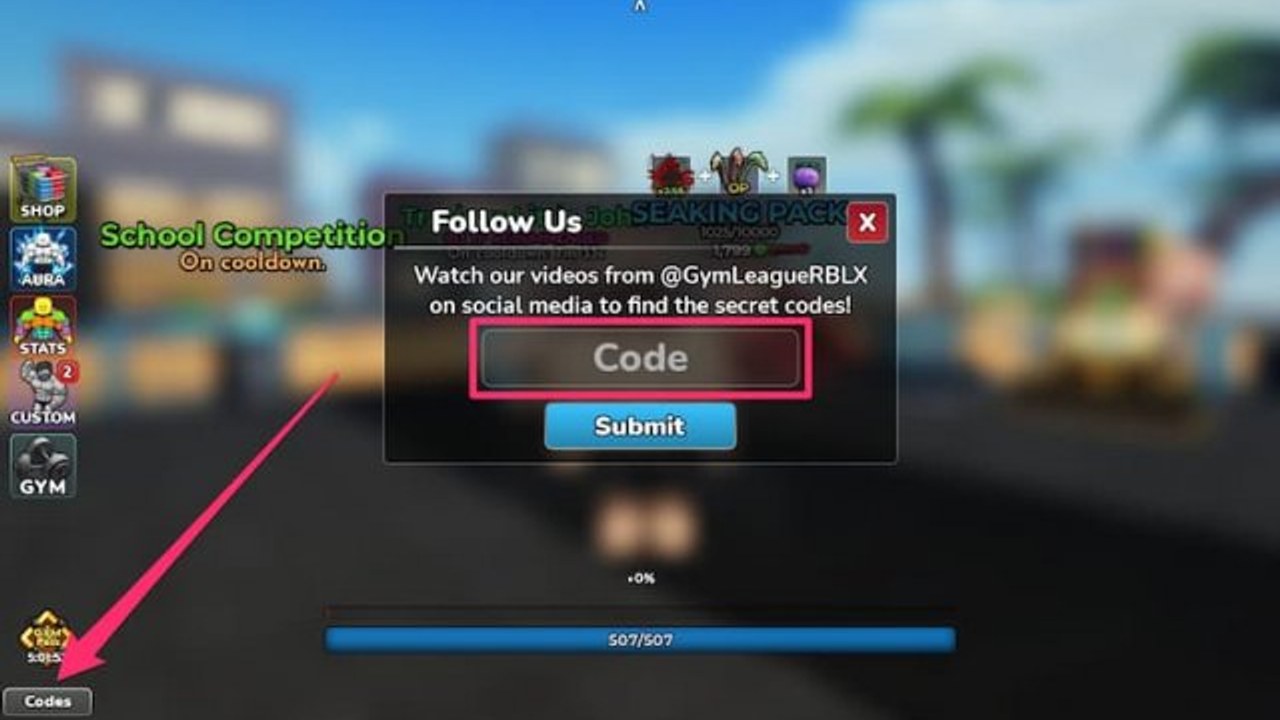
Gym League is a released free Roblox bodybuilding simulator from 1v2 Studios (place 17450551531, live since May 2024). You do not unlock a combo tree. You click or tap machines, open HUD panels, and mash spacebar when a posing event starts. This page is that map: the left column, the top bar, Stats, Gym travel, Custom poses and Gears, machine weights, competition inputs, Codes, and the Feedback menu. Pair it with Getting Started for the first Beach hour and with the Guides Hub when you need a different chapter.
Servers hold eight players. Private servers use the same HUD. Mobile and PC share every menu; only the input changes (tap versus click, tap versus spacebar). If a button is grey, the gym has not finished loading. Wait. Do not mash the left stack during the spawn fade.
Left column: Shop, Aura, Stats, Custom, Gym, Codes
The left HUD is the whole beginner interface. Typical top-to-bottom order:
- Shop — Body Alters and later cash sinks. You buy looks here when Total Power, 100% muscles, and cash line up. The purchase rules live on Body Alters.
- Aura — rolls and the on/off toggle for the cash multiplier you already own. Rolling advice is on the Auras Guide; ranks sit on the aura tier list.
- Stats (sometimes labelled STAT) — muscle percentages per group plus Total Power. This panel is how you know a machine is finished.
- Custom — poses for the stage, and later Gears that change pump, stamina regen, muscle growth, and training speed.
- Gym — travel between floors you have unlocked. Day one only lists Beach. The door list is on Gym Unlocks.
- Codes — typically bottom-left, under Gym. Type a string exactly and press Submit. Full steps: how to redeem codes. Live strings: working codes. Dead strings: expired codes.
Event layouts can add extra left buttons such as Summer or Return. Those are seasonal, not a new control scheme. If they appear, they sit in the same column; they do not replace Shop or Stats.
Do not hunt a hidden Beach interactable for Codes or Shop. Those are HUD. You can redeem and buy while standing still.
Top bar: cash, Aura toggle, Daily Reward, Quests, settings
The top of the screen is the session strip:
- Cash — the wallet that pays Body Alters, aura rolls, oils, and shop food. How to earn it is on How to Make Money.
- Aura on/off — a second toggle for the glow you already rolled. A disabled aura is a decoration. Turn it on before you pose.
- Daily Reward — claim it every session. Day one often lands around $250.
- Quests — the quest tab. Clear gym tasks while you rotate machines.
- Settings — client options. This is not where codes live, and it is not the bug form.
If cash does not tick after a contest or a code, wait a second on a busy eight-player server, then look again. Relog only after you confirmed the toast.
Stats: 100% muscles, not stamina
Open Stats before you grind. Each muscle group has a percentage. When a group hits 100%, stand up. Sitting on a finished lift does not buy Shredded faster.
Every muscle at 100% is required for Body Alters. Stamina is not. Stamina can sit below 100% and the Shop will still sell the look if Total Power and cash are ready. Do not park on cardio because you think the prestige wants a stamina bar.
Scan the whole list, not just chest. A 90% back with a 100% chest is why the Shop stays grey. Finish the short groups, then open Shop. The same rule holds on Underground, Golden, Jungle, and every later floor; only strength per click changes. Compact gym ranks live on the gym tier list.
Gym button: travel, do not train on the old floor
Gym opens the list of floors you own. Beach is free. Later gyms unlock when you complete the matching Body Alter (Tan for Underground, Rock for The Gym, Steel for Golden, and so on). If a name is missing, the alter is not done. If the name is there and you are still clicking Beach dumbbells, you are choosing the slow lane.
Tap or click the destination. You do not walk through a world gate for the main eight-gym ladder. After you land, open Stats and start a new 100% sweep on that floor’s machines.
Custom: poses and Gears
Custom is appearance and loadout, not a Body Alter. Body Alters are Shop prestiges. Custom is where you pick poses for competitions and, later, equip Gears.
Gears cover four jobs players actually use:
- Pump
- Stamina regen
- Muscle growth
- Training speed
You will not see a full Gear board on minute one. As you unlock slots, put growth and speed on long machine sessions, pump before you care about the on-stage look, and stamina regen when sets die early. The Extra Gear Slot gamepass adds another slot; it is not a first-hour buy. Compare it with muscle and cash passes on the gamepass tier list.
Poses are the stage routine. Rolling and picking a pose belongs on Poses. Oils and other consumables that sit beside the pose belong on Power-Ups. Custom does not replace oils, and a pretty pose does not replace Tan.
Machines: click, weight, Autoload, then leave
Walk or thumbstick to a rack. Sit. Click or tap to train that muscle. That is the entire rep. There is no hidden keyboard combo for a heavier curl.
Most machines expose + / − weight and Autoload. Autoload picks a load so you are not tapping plus ten times. Raise weight when the set feels free; drop it if the rep stalls. Autoload is a HUD helper, not a Robux pass, and it is not the same product as Auto Train on the store or unofficial auto-farm scripts.
Watch Stats, not the machine name. When that muscle hits 100%, leave. Rotate chest, back, legs, arms, and every other group the floor offers. Parking on a favourite Beach bench after 100% is the slowest habit in the game.
Competitions: spacebar on PC, tap on mobile
Posing events are online bodybuilding contests on the same eight-player servers. They are not split-screen. When the mash window starts:
- PC: mash spacebar.
- Mobile: tap.
Oils help the score. Apply them before you walk on stage, not after you lose. Pose quality, your current Body Alter, and a toggled aura all feed the result. Losses still pay. Deep lobby advice is on Competitions. This page only covers the input: spacebar versus tap, plus oils from the power-up layer.
If you miss the mash window, you still entered; you just presented a weaker pose. Do not quit the server. Take the payout and go back to machines.
Codes: exact string, Submit, case-sensitive
Open Codes under Gym. Type the code exactly. Gym League is case-sensitive. Bonusgains is not BONUSGAINS. Do not add spaces. Press Submit once. Watch for a success toast, then open inventory.
If Submit fails after a careful retype, the code is expired, mistyped, or already claimed. Check the expired list before you invent a new spelling.
Feedback: top-right, game still in development
The Roblox description says the game is still under development and asks you to report bugs from the in-game Feedback menu at the top-right. Use that first. Include gym, Body Alter, and the button you pressed. Settings is not Feedback. Discord is extra, not a replacement. Community context: Players. Patch context: latest update. Official destinations: links and the Trello page.
Mobile versus PC
Same menus. Same Codes field. Same Shop checks. Differences:
- Click versus tap on machines and HUD buttons.
- Spacebar mash versus tap mash in competitions.
- Phone keyboards auto-correct codes (
frozenintoFrozen). Turn that off. - Landscape leaves more room for the left column on small screens.
- The Feedback control is still top-right; do not hunt it inside Settings.
Private servers and public eight-player rooms share this HUD. You do not need a new control scheme when you hop. Automation notes, if you want them later, sit on the scripts hub — they do not change where Codes or Stats live.
First-session order after you can find every button: redeem codes, rotate to 100% on Stats, buy Shredded, pose once with spacebar or tap, then keep the Getting Started checklist open until Tan. Come back here when a friend cannot find Codes, when a Gear slot appears in Custom, or when Autoload is confused with a gamepass.
Frequently Asked Questions
Quick answers to the most common Gym League questions.
Where is the Codes button on the Gym League HUD?
Left column, typically bottom-left under Gym. Type the string exactly and press Submit. Codes are case-sensitive. Full steps: how to redeem codes.
Do I need stamina at 100% before a Body Alter?
No. Stats must show 100% on every muscle group. Stamina is not the Shop gate. Total Power and cash still have to line up. See Body Alters.
What is the competition input on PC versus mobile?
Mash spacebar on PC. Tap on mobile. Oils help the score. Losses still pay. Lobby strategy is on Competitions.
What is Custom for, if Shop buys Body Alters?
Are Gym League menus different on mobile?
No. The same left HUD and top bar appear on phone and PC. You tap instead of click, and you tap instead of mashing spacebar in posing events. Turn off auto-correct before you redeem codes.
Where do I report a Gym League bug?
Use the in-game Feedback menu at the top-right, as the Roblox description asks. Include gym, Body Alter, and the button you pressed. Settings is not the bug form. See Players.